Automates the secure bulk retrieval of Form 26AS, AIS and TIS directly from the Income Tax e-Filing Portal — for multiple clients, in one click.

Latest Release · v1.4.0 · 11 Jun 2026

Windows Setup

Recommended for most existing Windows users. Use this if you previously installed AayDocCapio with the .exe setup.

Download .exe v1.4.0 · Wizard Installer

Windows MSI

For new enterprise or IT-managed installs. If switching from .exe, uninstall the .exe version first.

Download .msi v1.4.0 · Silent / managed install

macOS App

Apple Silicon app bundle packaged as a zip. Open the app once via right-click → Open if Gatekeeper warns.

Download macOS zip v1.4.0 · .app bundle

Windows 10 / 11 64-bit · macOS Apple Silicon · Requires Google Chrome for AIS/TIS  ·  All releases →

Windows Defender or your browser may flag unsigned installers. This is a false positive. AayDocCapio is open source and communicates only with official ITD portals. How to allow it and install →
AayDocCapio v1.4.0

26AS TXT to Excel + HTML Auto-converts downloaded 26AS TXT files into structured Excel workbooks and HTML output.
Status filtering Filter clients by downloaded, failed, partially completed, queued, or not run yet.
Improved batch progress Per-client conversion states, clearer warnings, and saved-location links for faster review.
Download history by AY/FY Last status and saved folder are remembered per client and assessment year.
Assessment year management Add, remove, reorder, and toggle AY/TY/FY entries from Settings.
Light and Dark Navy themes Switch appearance from Settings; the preference is saved across sessions.
Installer options Windows .exe, Windows MSI, and macOS .app zip are now published from the v1.4.0 release.
Safer installer migration Installers preserve app data and guard against mixing .exe and MSI installs accidentally.
Large-file and unlock fixes Better handling for TRACES on-demand 26AS cases, ZIP/PDF unlock failures, and locked Excel files.
Existing Windows users should upgrade with AayDocCapio_Setup_v1.4.0.exe. Use MSI for new managed deployments.
Built for Chartered Accountants & Tax Professionals — eliminate repetitive manual downloads across all your clients.

Why AayDoc Capio?

Aay (आय)Income
·
DocDocuments
·
Capio (Latin)To Obtain / Retrieve

AayDocCapio is designed to securely retrieve and deliver income tax documents, eliminating repetitive manual downloads and improving efficiency for tax professionals.

Everything you need for bulk tax downloads

🔐

Encrypted Credential Vault

PAN, DOB, and portal passwords are stored locally in tax_vault.json with PBKDF2HMAC + Fernet AES-128. No cloud sync or telemetry.

📑

26AS, AIS and TIS

Download Form 26AS PDF + TXT, AIS PDF, and TIS PDF for all selected clients in a single sequential batch.

📘

26AS Excel Workbook

Convert 26AS TXT into Excel + HTML with Assessee Details, Part I-IX sheets, summary links, and large-file streaming.

📊

Live Batch Progress

Per-client real-time status, conversion state, saved-folder links, Stop control, and step-by-step logs.

📥

Excel / CSV Import

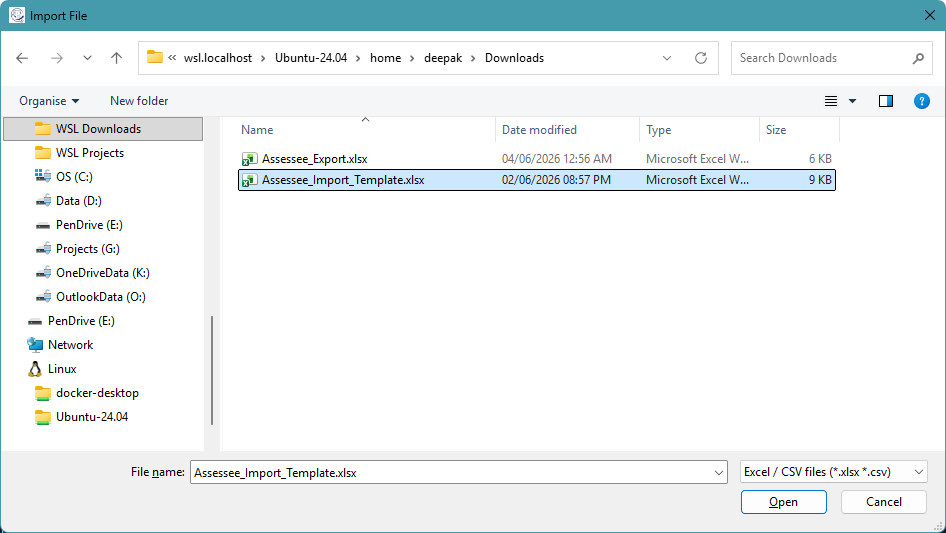
Bulk-load assessees from Excel or CSV. Generate a pre-formatted import template in one click.

🗂️

Status and History

Filter by status and review the last result and saved location per client, per AY/FY.

📅

AY / TY / FY Management

Manage assessment, tax, and financial year entries from Settings and keep output folders consistently labelled.

🔓

Auto Unlocking

PDFs and 26AS TXT ZIPs are unlocked using PAN and DOB-derived passwords, with clear warnings if DOB is wrong.

🌗

Themes and Headless Mode

Light and Dark Navy themes, plus hidden browser automation by default with visible debug mode when needed.

Up and running in 5 steps

Install the app

Run AayDocCapio_Setup_v1.4.0.exe for a standard Windows install, or use the MSI for new managed deployments. The app downloads the Chromium browser engine automatically when needed.

Add your clients

Add clients manually from Client Master, or import Excel / CSV records with Name, PAN, DOB, and Password columns.

Select AY/FY and Output Folder

Pick the AY/TY/FY entry from the dropdown, manage years from Settings, and choose where downloaded files should be saved.

Select clients and click Run

Tick one or more clients, click ▶ Run, and choose Download 26AS or Download / Request AIS & TIS. A live progress popup tracks every client in real time.

Collect your files

Files are saved to <Output Dir>/<PAN>-<Name>/AY_<year>/. 26AS can include PDF, TXT, Excel, and HTML outputs.

⚠️ AIS/TIS require Google Chrome. Form 26AS works without it. Ensure Chrome is installed before downloading AIS or TIS.
Large AIS files? If the ITD server queues your AIS, AayDocCapio notifies you. Wait ~5 minutes, then use Download Previously Requested AIS to fetch it automatically.
📄 Batch report included. Each run can produce an Excel report with status, folder hyperlink, and per-row timestamp.

See it in action

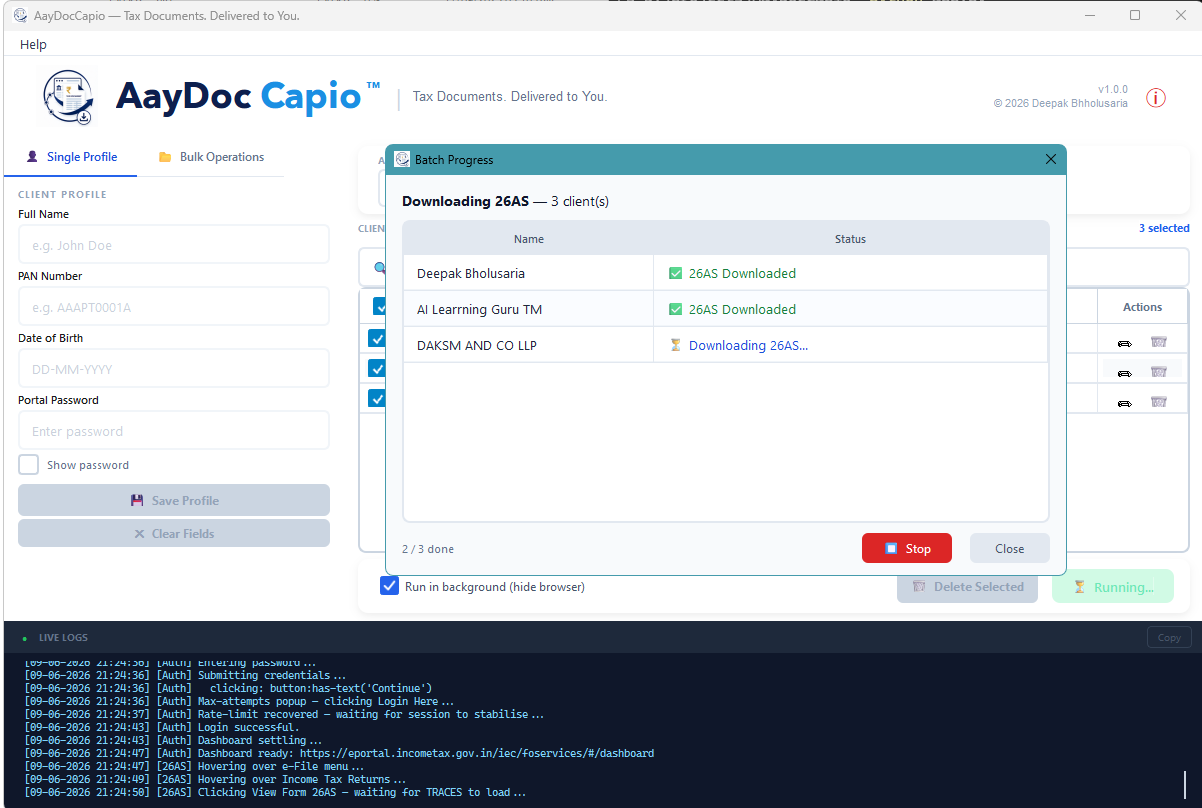
26AS Batch Download
Batch Progress — 26AS Download for multiple clients
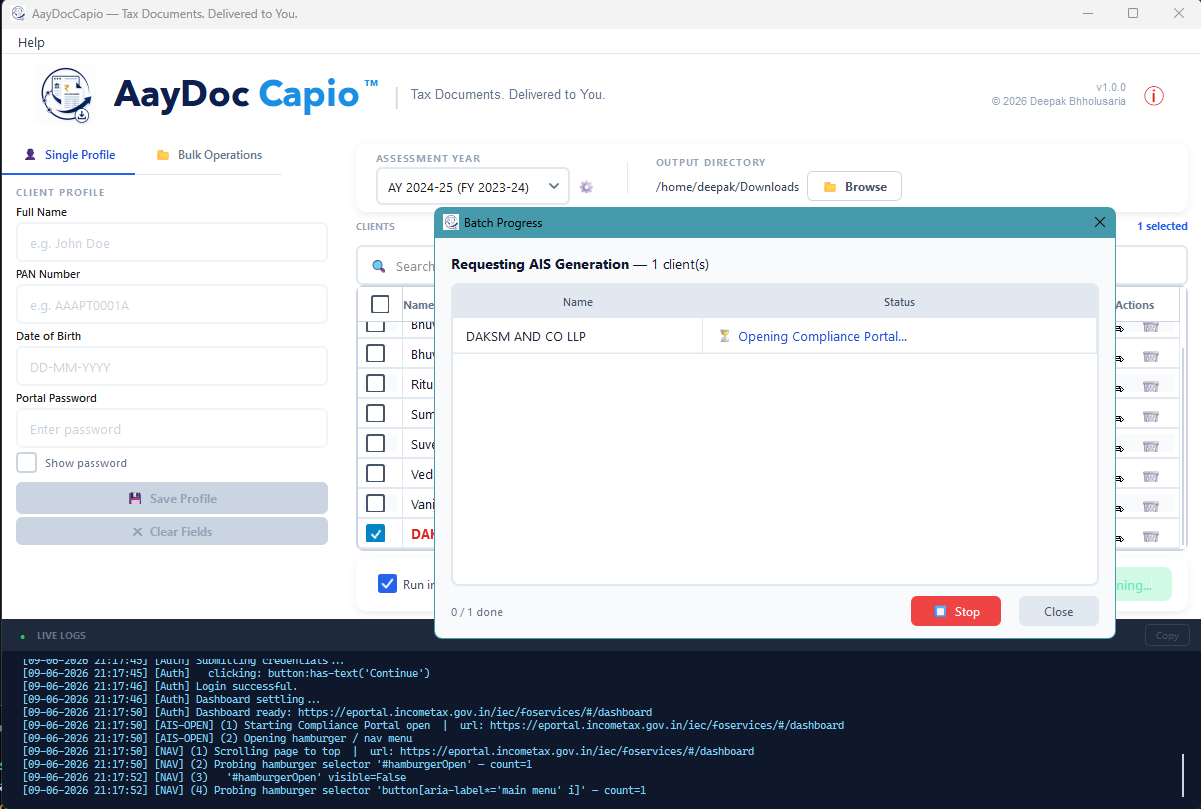
AIS Request
Batch Progress — AIS Generation Request
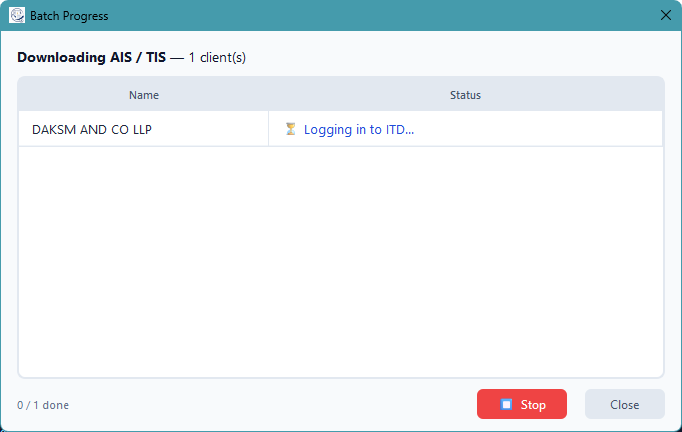
AIS Download
Batch Progress — AIS/TIS Download in progress
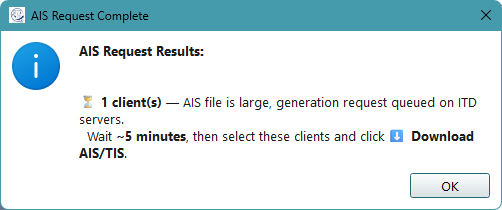
AIS Request Result
AIS Request Result — queued on ITD servers
Import Dialog
Bulk Import — Excel / CSV file picker
About Dialog
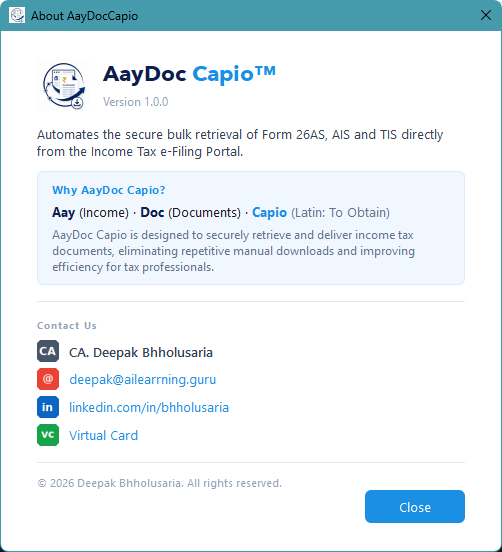
About AayDocCapio

Your data stays on your machine

ConcernHow it's handled
Credential storageAES-128 (Fernet) encrypted local file — tax_vault.json
Key derivationPBKDF2HMAC / SHA-256, 100,000 iterations
Installer upgradestax_vault.json and assessment_years.json are preserved during uninstall or migration
PAN in logsPAN is never included in error or log output
Vault in gittax_vault.json is in .gitignore — never committed
NetworkCredentials only submitted to the official ITD portal — no third-party services

Common questions

Is my data safe? Where are credentials stored?

All credentials (PAN, DOB, portal password) are stored in an encrypted local file tax_vault.json on your machine using PBKDF2HMAC + Fernet AES-128. Nothing is sent to any server — the app only communicates directly with the official ITD e-Filing portal.

Why does AIS/TIS require Google Chrome?

The Insight/AIS portal's download buttons only fire correctly in real Google Chrome. Playwright's bundled Chromium does not trigger the download event on that portal. Form 26AS works fine without Chrome.

What does "AIS request queued" mean?

When an AIS file is large, the ITD server queues its generation. AayDocCapio will show a notification with a reference number. Wait ~5 minutes, select those clients, and click Download Previously Requested AIS.

Can one client's failure stop the whole batch?

No. Each client is fully isolated — if one fails (wrong password, portal timeout, etc.), the reason is shown in the progress popup and the batch continues for all remaining clients.

Where are the downloaded files saved?

Files are saved to the output directory you choose, in the structure: <Output Dir>/<PAN>-<Client Name>/AY_<year>/. PDFs are automatically unlocked and ready to open. 26AS outputs can include PDF, TXT, Excel workbook, and HTML.

Which Windows installer should I use?

Use the .exe setup for normal users and for upgrades from older .exe installs. Use the .msi for new IT-managed deployments, silent installs, or Group Policy deployment. Avoid installing both types on the same machine.

Will uninstalling remove my client vault?

No. The installers are configured to preserve app data. Your tax_vault.json and assessment_years.json remain on the machine during uninstall or installer migration.

Can I switch from MSI to EXE or EXE to MSI?

The app guards against accidentally mixing installer types. The .exe installer can prompt to remove an existing guarded MSI install before continuing. If moving from an older .exe install to MSI, uninstall the .exe version first, then install the MSI.

Can I use it without installing?

Yes. The portable dist\AayDocCapio\ build folder can be zipped and run directly without installation. The installer is recommended for most users.

Windows Defender or my browser says "Virus detected" — is it safe?

Yes, this is a false positive. AayDocCapio is compiled from Python source using Nuitka. Compiled Python binaries are commonly flagged by heuristic antivirus scanners because their byte patterns resemble packed executables — even though the code is entirely safe and open source.

If Brave / Chrome blocks the download:
Click the ↓ download icon → click next to the file → KeepShow moreKeep anyway.

If Windows Defender shows "Threats found":
Open Windows Security → Virus & threat protection → Protection history, find the entry, click Actions → Allow on device.

If Windows SmartScreen blocks the installer:
Right-click the file → Properties → tick UnblockApply. Then run it — if SmartScreen still appears, click More info → Run anyway.

You can audit every line of code at github.com/dkbholusaria/AayDocCapio.

Built by a CA, for CAs

AayDocCapio

CA. Deepak Bhholusaria

AayDocCapio was created to eliminate the repetitive manual effort of downloading income tax documents for multiple clients every season. It is free, open source, and built entirely with Python.